Splunk App for Amazon Connect: End-to-End(point) Visibility for an Optimal Customer Experience
H

Last year, Splunk announced an integration with Amazon Connect offering several features like Connect instance performance, capacity management, real-time and historical trending of key contact center queue and agent metrics, and advanced analytic capabilities using data highlighting customer or agent sentiment. With the decentralized model of contact centers here to stay, at least for most organizations, it was clear from the beginning that we needed to help our customers complete the picture and provide end-to-end CX visibility — including the “last mile.”
Experience Detection
With the most recent release of the Splunk App for Amazon Connect, we have incorporated real-time insight into metrics like packet loss, latency, and jitter, measured from an endpoint device like an agent laptop or workstation. This detection capability offers a glimpse of whether there may be bandwidth issues or resource contention on devices, causing poor audio or video quality resulting in a bad CX. Other features include geolocation to help identify issues impacting a specific region or individual, disconnect direction to ensure compliance standards are met where only customers can end calls, and visibility to see when agents are experiencing difficulty setting up a connection, how long it takes before they start talking, and even determine if the microphone is the culprit.
Imagine being on hold for 30 minutes, finally connecting to an agent, only to hear static or have a situation where voice transmission is unidirectional. With silence captured via sentiment analysis, and additional insights from the endpoint, the entire CX is easily detected, and the data tells the story.
Put It Into Action
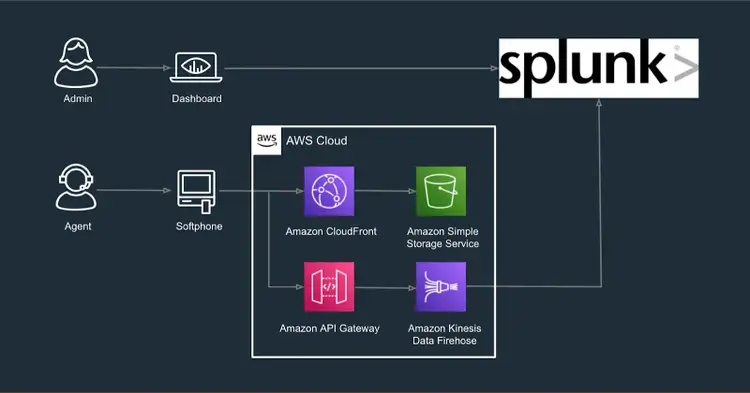

Download the Splunk App for Amazon Connect onto your Splunk environment today. If you don’t have one, we have you covered with a free Splunk Cloud trial. To learn more about how Splunk can help deliver consistently great CX every time, take a look at the Splunk for Amazon Connect solution guide.
This blog post was co-authored by Khalid Ali and Anush Jayaraman.
Khalid Ali leads solution strategy for the Communications, Media, and Technology (CMT) industry at Splunk, where he enjoys uncovering eureka moments for customers looking to address problems with data-driven solutions. His foundational experience comes from various operations, engineering, and architecture roles and over 15 years in the telecommunications space, building performance monitoring solutions for voice, video, and data services.
Related Articles
Dashboard Studio Tips: What's New in 8.2.2106

Deep Learning Toolkit 3.5 - Part 2: Change Point Detection, Matrix Profiles and LSTM-based Predictions